If you find this add-on useful, please star it on GitHub — stars show appreciation and help maintainers know their work matters.
ddev-typo3-multi-version-extension




Testing a TYPO3 extension against several major versions normally means either
juggling one DDEV project per version or repeatedly swapping the typo3/cms-*
constraint in a single composer.json. This add-on runs TYPO3 12, 13 and 14 as
sibling instances inside one DDEV project, each with its own hostname and
database, all symlinking the same extension checkout - so a change is visible
on every version at once, without reinstalling anything.
✨ Features
- Parallel TYPO3 instances: TYPO3 12, 13 and 14 run side by side by default under
.Build/<version>/; TYPO3 11 can be re-enabled (see Configuration) - Classic (non-Composer) mode: rebuild any version as a TER-style install to catch bugs that only surface outside Composer autoloading
- Fixture import: XML exports, raw SQL, site configurations and shell scripts are imported automatically on every install
- Demo content profiles: populate an instance with
typo3/cms-introductionorbk2k/bootstrap-packageinstead of a blank page - Install hooks,
project.shanddocker-compose.zz-project.yaml: add composer packages, TYPO3 settings, custom install steps and env var overrides without touching add-on-managed files - Git worktree support: run several checkouts of the same repository side by side without hostname collisions
🔥 Installation
Important
Requires a DDEV project with the project name set to your extension key (e.g.
custom-extension), apache-fpm or nginx-fpm as the webserver type, and a
valid composer.json in the project root. Git worktree support additionally
requires DDEV >= v1.24.10.
Updating
Run ddev add-on get konradmichalik/ddev-typo3-multi-version-extension && ddev restart again to pick up add-on updates in an existing project.
Files that ship with a #ddev-generated marker (e.g. .ddev/.setup/scripts/utils.sh, .ddev/.setup/templates/index.php, the commands/web/* wrappers) are overwritten on every update. If you need to customize one of them, remove that marker line from your project’s copy - DDEV will then leave the file alone on future updates.
🚀 Quick start
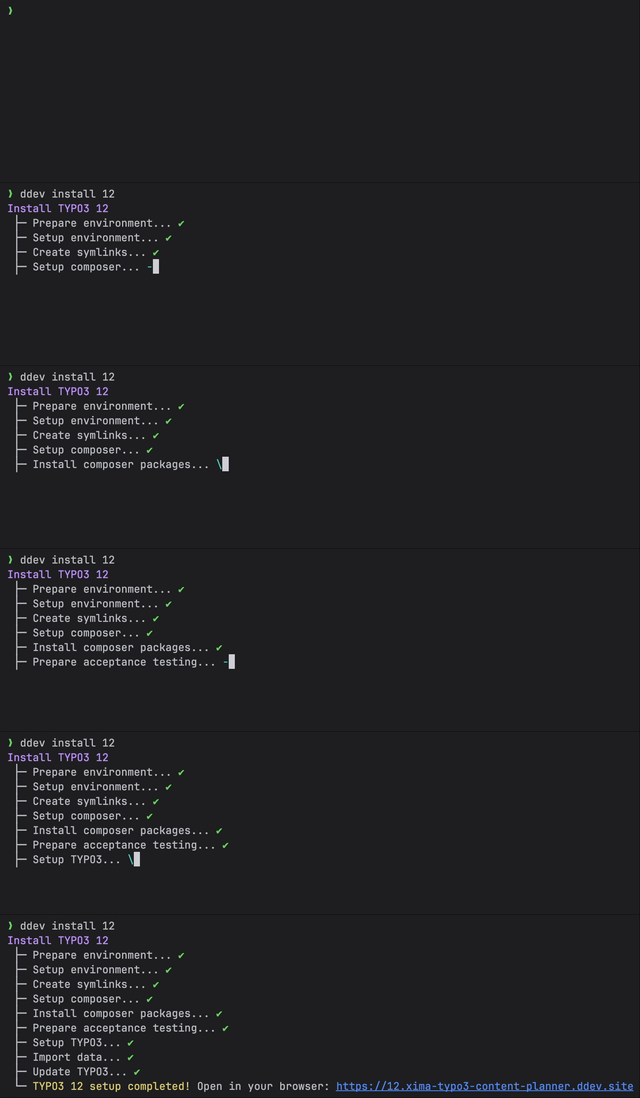
ddev install all
ddev launch
That installs a blank TYPO3 instance for every configured version and opens the intro page, which links to each running instance.
⚡ Usage
| Command | Does |
|---|---|
ddev install [version\|all] [-v] [--demo[=profile]] [--classic] |
Install or rebuild one or all TYPO3 instances |
ddev launch [version] [/path] |
Open an instance in the browser |
ddev <version> <command> |
Run a command inside one instance, e.g. ddev 13 typo3 cache:flush |
ddev all <command> |
Run a command in every installed instance |
ddev worktree-init |
Regenerate hostnames for a git worktree checkout |
ddev worktree-remove |
Tear down a worktree’s DDEV project |
Full flags, exit behaviour and examples for every command are in docs/installation.md and docs/commands.md.
🏗️ Architecture
Each TYPO3 instance lives in its own subdirectory of .Build/, with the main
extension symlinked in from the project root:
.
└── .Build/
    ├── 12/
    │   ├── config/
    │   ├── packages/
    │   │   ├── sitepackage/
    │   │   └── your-ext/
    │   ├── public/
    │   ├── var/
    │   ├── vendor/
    │   ├── composer.json
    │   └── composer.lock
    └── ...
.Build/ is gitignored - every checkout (including every git worktree) runs
its own ddev install.
📚 Documentation
| Topic | What’s inside |
|---|---|
| Installing instances | Every ddev install flag: versions, --classic, --demo[=profile], -v/--verbose |
| Commands | ddev launch, running commands per version or across all instances, worktree commands |
| Configuration | project.sh variables, install hooks, fixtures, symlink exclusions, application context, CS-fixer exclusion |
| Classic mode | Rebuilding a version as a non-Composer, TER-style install |
| Git worktrees | Running several checkouts of the same repository side by side |
🧑💻 Contributing
Please have a look at CONTRIBUTING.md.
💎 Credits
Contributed and maintained by @konradmichalik.
⭐ License
This project is licensed under Apache-2.0.
If you find this add-on useful, please star it on GitHub — stars show appreciation and help maintainers know their work matters.