If you find this add-on useful, please star it on GitHub — stars show appreciation and help maintainers know their work matters.




DDEV Drupal Contrib Lite
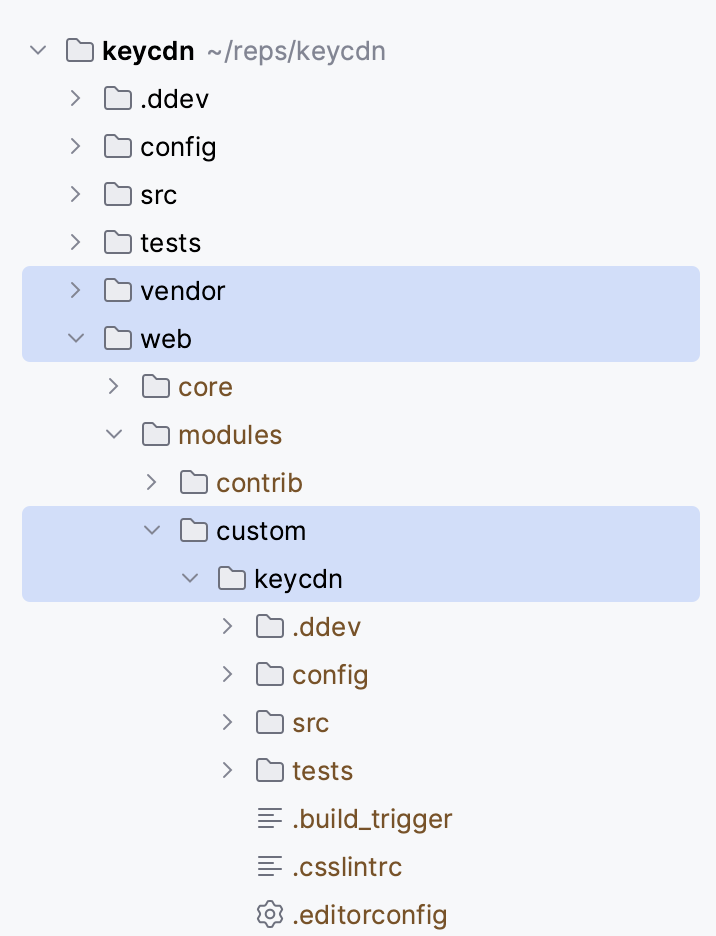
DDEV integration for developing Drupal contrib projects. This add-on uses a standard Drupal codebase layout (see image below) and commands in this project match the Gitlab CI approach from the Drupal Association.
Install
- If you haven’t already, install Docker and DDEV
- Install Drupal in a new DDEV environment as per the CMS Quickstarts, for either Drupal core or Drupal CMS.
- If your projects are available via composer you can bring them in using
ddev composer require drupal/[project_name] --prefer-sourceoptionally specifying the dev branch. Otherwise,git cloneyour project(s) in/sites/modules/customor the appropriate equiavelent. - If necessary, use
git checkouton any imported projects to ensure the correct target branch is in use. - Execute the commands below, adjust as needed.
# Add this DDEV add-on.
ddev add-on get mandclu/ddev-drupal-contrib-lite
# Pull in the add-on dependencies.
ddev poser
# Detect expected Drupal and PHP versions.
ddev config --update
- To use eslint locally, there is one additional step:
# Use yarn to install node_modules.
ddev exec "cd web/core && yarn install"
Commands
This project provides the following DDEV container commands.
ddev phpunitRun PHPUnit tests.ddev nightwatchRun Nightwatch tests, requires DDEV Selenium Standalone Chrome.ddev phpcsRun PHP_CodeSniffer.ddev phpcbfFix phpcs findings.ddev phpstan. Run phpstan on project files.ddev eslintRun ESLint on JavaScript files.ddev stylelintRun Stylelint on CSS files.ddev core-version. Update your codebase to a newer or older version of Drupal core. More info.
All linting and analysis commands (phpcs, phpcbf, phpstan, phpunit, eslint, stylelint, nightwatch) accept an optional target as their first argument:
- Omit the target to run against all projects in the configured
$DRUPAL_PROJECTS_PATH. - Pass
.to run against the current working directory. - Pass a specific path to target any directory, e.g.
ddev phpcs web/modules/custom/mymodule.
Codebase layout
Misc
- Optional. The ddev-selenium-standalone-chrome add-on helps run FunctionalJavascript and Nightwatch tests.
- Optional: Install the ddev-mkdocs extension for local preview of your docs site. Drupal.org’s Gitlab CI can automatically publish your site.
- Optional. Commit the changes in the
.ddevfolder after this add-on installs. This saves other users from having to install this integration. - To install javascript dependencies, run
ddev exec "cd web/core && yarn install" - If you add/remove a root file or directory, re-symlink root files via EITHER of these methods
ddev restartddev symlink-project
cweagans/composer-patches:^1is added byddev poserso feel free to configure any patches that your project needs.- Any development dependencies (e.g. Drush) should be manually added to require-dev in your project’s composer.json file. Don’t use the
composer requirecommand to do that.
Changing defaults
Override any environment variable value from .ddev/config.contrib.yaml by creating a .ddev/config.local.yaml (or any filename lexicographically following config.contrib.yaml) file which has the same structure as .ddev/config.contrib.yaml. Add your overrides under web_environment.
Changing the Drupal core version
Use the ddev core-version command to set the core version environment variable and update the dependencies, for example:
ddev core-version ^11
You can also do this manually by setting a version in .ddev/.env.web:
DRUPAL_CORE=^11
Then run ddev restart and then ddev poser to update the Drupal core version.
If Drupal core cannot be changed because the project is using an unsupported version of PHP, ddev poser will show a composer error. In that case, open .ddev/config.yaml and change the PHP_VERSION to a supported version; then run ddev restart and ddev poser again. Note that the project PHP version is set in .ddev/config.yaml, while the core version to use is set in .ddev/.env.web.
Changing the symlink location
In .ddev/config.local.yaml set the location relative to webroot (which usually is web/). Defaults to modules/custom
web_environment:
  - ...
  - DRUPAL_PROJECTS_PATH=modules/custom
Then run ddev restart to update the symlink location.
To use with Drupal themes, set DRUPAL_PROJECTS_PATH=themes/custom in your config.local.yaml.
Example of a successful test
This is what a successful test looks like, based on Config Enforce Devel.
user:~/config_enforce_devel$ ddev phpunit
PHPUnit 9.6.15 by Sebastian Bergmann and contributors.

Default Target Module (Drupal\Tests\config_enforce_devel\Functional\DefaultTargetModule)
 ✔ Default target module created

Form Alter Implementation Order (Drupal\Tests\config_enforce_devel\Functional\FormAlterImplementationOrder)
 ✔ Form alter implementation order

Theme Settings Form (Drupal\Tests\config_enforce_devel\Functional\ThemeSettingsForm)
 ✔ Theme settings form submit

Time: 00:13.453, Memory: 4.00 MB

OK (3 tests, 20 assertions)
To run a single test class or directory, pass the path as the first argument. Or use --filter to refer to a test class or method. For example:
ddev phpunit web/modules/custom/mymodule
ddev phpunit web/modules/custom/mymodule/tests/src/Unit/MyTest.php
ddev phpunit --filter testMyFunction
Automatically correct coding standard violations
You can set up a pre-commit hook that runs phpcbf:
- Create a new file
touch .git/hooks/pre-commitin your repository if it doesn’t already exist. - Add the following lines to the
pre-commitfile:
#!/usr/bin/env bash

ddev phpcbf -q
- Mark the file as executable:
chmod +x pre-commit.
AGENTS.md
This project contains an AGENTS.md file with instructions on how to use the commands provided. It may be useful to copy some or all of this content into your project’s AGENTS.md files, or potentially reference the provided file so that AI agents can access it as needed.
Troubleshooting
“Error: unknown command”:
The commands from this addon are available when the project type is drupal. Make sure the type configuration is correctly set in .ddev/config.yaml:
type: drupal
Tip
Remember to run ddev restart if .ddev/config.yaml has been updated.
Contributing
Tests are done with Bats. It is a testing framework that uses Bash. To run tests locally you need to first install bats’ git submodules with:
git submodule update --init
Then you can run within the root of this project:
./tests/bats/bin/bats ./tests
Tests will be run using the default drupal core of the contrib. To test against a different Drupal core version, update the TEST_DRUPAL_CORE environment
variable.
i.e. TEST_DRUPAL_CORE=11 ./tests/bats/bin/bats ./tests.
Tests are triggered automatically on every push to the repository, and periodically each night. The automated tests are against all the supported Drupal core versions.
Also, consider adding tests in your PR.
To learn more about Bats, see the documentation.
Credits
Contributed and maintained by Martin Anderson-Clutz (@mandclu), but building on work by Moshe Weitzman (@weitzman) and Dezső BICZÓ (@mxr576)
If you find this add-on useful, please star it on GitHub — stars show appreciation and help maintainers know their work matters.